User Flow what is it and why is it an important step in UX design?
In the article you will learn what user flow is, what its types are, why it is worth using the tool and what programs to use to design it.
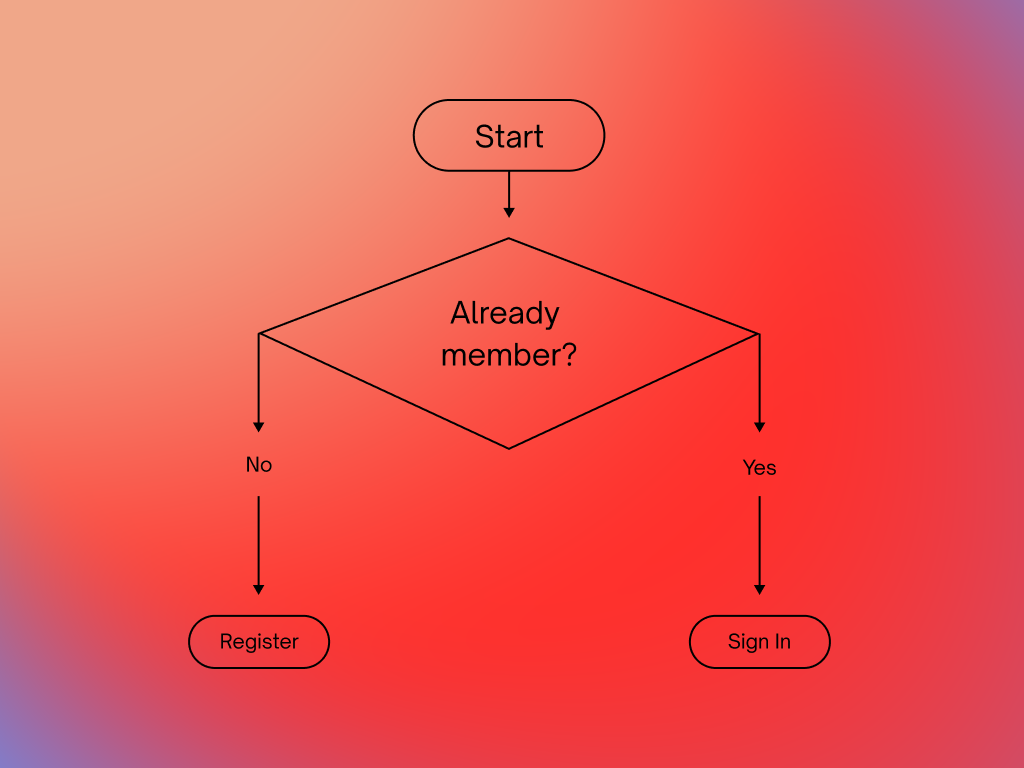
Often, starting a new project is so attractive that we would prefer to start by designing ready-made screens that we already have in our heads rather than thinking aboutuser flow. Doesn’t that sound tempting? Who among us hasn’t thought „fuck information architecture and boring arrows. I’ll design wireframes and somehow it will be okay.”
Regardless of whether we are starting a new project or introducing an existing product, it is good to know its plan. Let’s imagine that we are moving to a new apartment and we want to hang a poster on the wall. We don’t know the layout of electrical cables and when drilling a hole we find a cable. In complex digital systems, ignorance or ill-thought-out information architecture may have much more disastrous consequences.
Almost always, skipping such important steps as developing information architecture drags on projects, creating technological debt. Ultimately, it may resultpoor user experience, underdeveloped functionalities, security gapsWhethereven financial lossesfor the product owner.
I wrote more about the key elements that are worth paying attention to when designing a new digital product in the article,What should you remember when creating a mobile application or website?Today I would like to answer your questionsUser Flow what is it?And I will also give you some examples of how to make them?
What is User Flow?
User Flowdescribes the steps users take to access functionality or perform a specific task in an application.Every click, „„tap”orstall, in other words an action, is part of the user flow. It doesn’t matter whether it is a website, a mobile application or a service, e.g. for a bank. Each product that ultimately provides the ability to interact with the user ultimately has its own unique paths.
Answering the questionwhat is User Flowone can answer that it is a map of the entire application, all steps and sequences of the designed application.
User Flow is a map showing the direction to a destination
Let’s imagine planning an expedition to a distant continent. Having gathered a crew, a ship and having a specific goal for the expedition, we also need a map thanks to which we will, first of all, get to the planned place, but also along the way we will be able to predict any dangers such as sea currents, shoals or pirate ships prowling near our route.
The more dangers that are anticipated early in the journey, the lower the risk of drowning and arriving at the destination unscathed.
User Flowit is, in other words, a form of a map of our application, thanks to which each team member will be able to find each other. Even in simple applications, flow is an important part of the user interface. Creating mobile or web applications is often a complex activity, balancing functionality and usability. On the one hand, we want users to quickly gain access to the most important functionalities of the application with as few interactions as possible, e.g. clicks.
On the other hand, the application has a huge amount of content and situations that must be properly packaged to make the product functional, e.g. error handling that may negatively affect the User Experience of a given action. User Flow can also be a great 'skeleton’ for creationUser (customer) Journey Maps.
Types of user flow
- Flowchart –is a method of representing a sequence of applications and algorithms using a set of symbols to represent user paths. The International Organization for Standardization (ISO) has developed a set of symbols that are standardized around the world for computer-aided flowchart creation. You may remember this from your junior high or primary school computer science lessons.
- Wireflow –combination of Flowchart and Wireframes. The most popular tool for creating this type of diagram is an applicationOverflow. It involves illustrating user paths based on existing graphical interface designs.
Process analysis at an early stage of the project
User Flow is a design tool that focuses on mapping the user’s path in an application or system. Its main goal is to visually represent the process a user goes through, starting from the first interaction with the application until reaching the final goal, such as registering an account.
The elements that make upUser Floware mainly simple geometric figures, such as squares, and arrows indicating the direction of the user’s path. It is important thatUser Flowit does not have to be a linear path – it can contain alternative routes, loops and branches, reflecting the complexity of interactions in the real world.
Its basic purpose is to check whether all processes, from interacting with the application to the intended goal, e.g. registering a new account, have been fulfilled, and also facilitates a holistic view of the entire system.
They provide the opportunity to visualize the entire, often complex project for the entire team. Thanks to this, the goals and individual functionalities becomeunderstandable to all stakeholderse.g., managers, development team, designers, etc. Personally, I have been using this tool sincethe beginning and during the project,updating them with changing functionalities.
User Flow is also of key interdisciplinary importance. It facilitates collaboration between different departments and stakeholders, allowing different perspectives to contribute to the identification of potential problems or challenges. This tool is flexible and can be updated as the project evolves, allowing it to adapt to changing requirements and functionality.
Discussing User Flow at the early stages of the project allows you to quickly identify and solve potential problems before entering the implementation phase. Such early detection and resolution of problems is crucial to the efficiency and success of the entire development process.
Why is it worth using User Flow?
- Preventing design errors: User Flow allows you to detect and eliminate potential gaps in user paths and prevents processes from being left unfinished. This is crucial in application design, where any unforeseen path can lead to user frustration.
- Visualization of the user path: By graphically representing the user journey, the design team can better understand how users navigate the application. This, in turn, allows you to optimize and improve interactions.
- Creating developmental hypotheses: User Flow is helpful in making assumptions about the difficulties users may encounter and where conversions may vary. This, in turn, allows for more effective planning of improvements.
- Comparison of alternative solutions: Allows you to test different scenarios and select the most effective solutions, leading to better design.
- Product management made easier: Introducing changes becomes easier and more thoughtful, which minimizes the risk of errors and the need to make modifications at the product development stage.
- Understanding the project architecture: User Flow provides a clear picture of the project structure, which is invaluable for team understanding and communication.
- The basis for creating prototypes: Allows you to focus on specific screens and functionalities, which is especially important whencreating application prototypes.
- A compendium of knowledge for the project team: User Flow is a valuable source of information for various team members – from developers to designers, which facilitates collaboration and project consistency.
- A tool for continuous development: Constantly developing and updating User Flow allows for ongoing verification of the effectiveness of various user paths, which is crucial for dynamic product management.
Need help creating User Flow?
Wondering how to improve user experience in your app?Learn more about our approach to User Flow designin UX/UI and see how we can help your project reach its full potential.
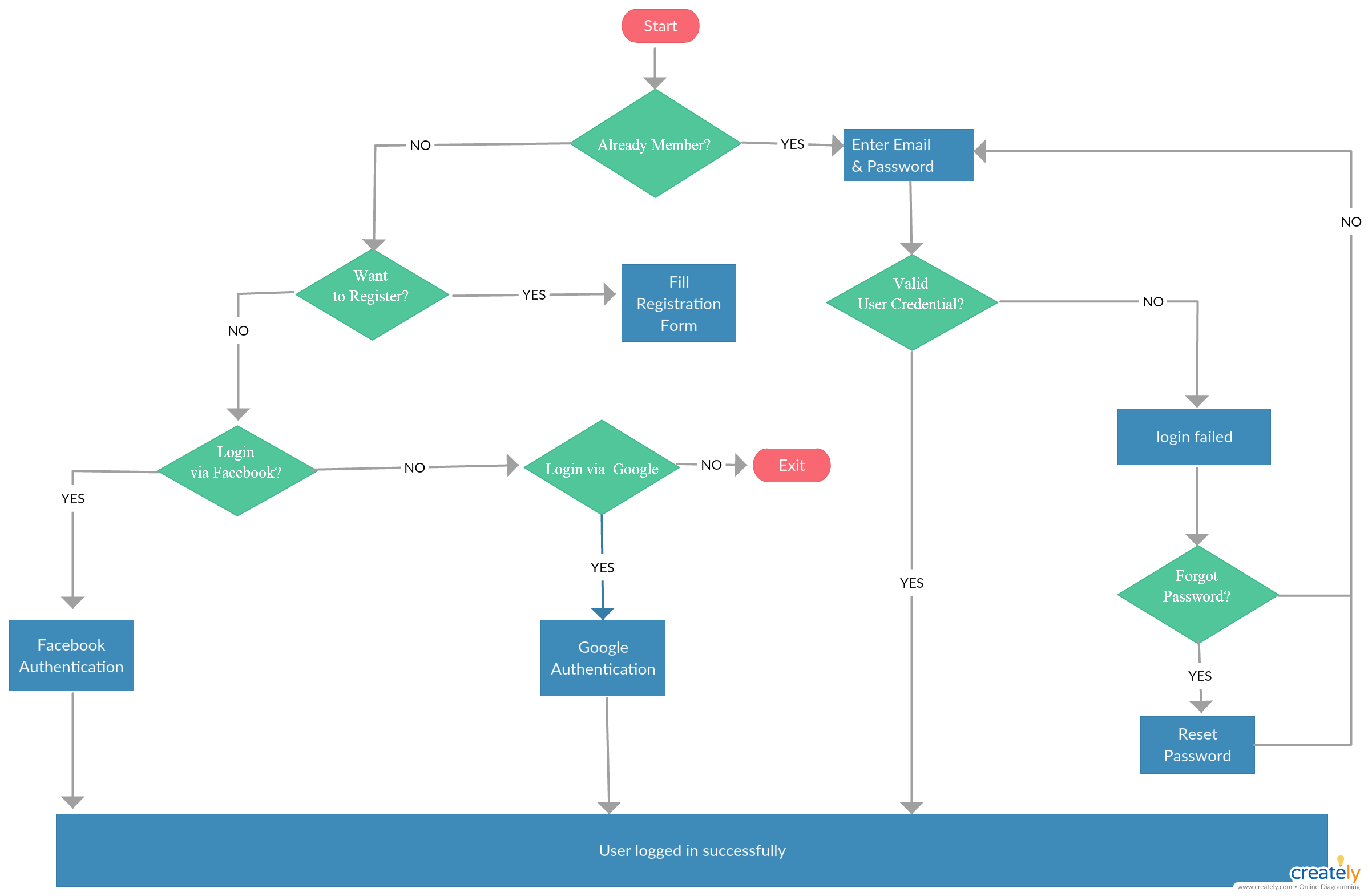
Sample User Flow (Flowchart) of a Web application:
See also:What should you remember when creating a mobile application or website?
User Flow – How to make it? What programs to use?
| Tool | Tool description |
| Card or board | This may be obvious to most people, but nothing can replace a white board and brainstorming, or optionally, a piece of paper in the early phase. It is worth starting with a scratchpad to quickly validate concepts and user flow paths / execution of individual actions. Simple is better! |
| Wireflow | A super simple tool, especially for non-technical people. Enoughrun the application, select the components we are interested in, connect them with arrows and that’s it! |
| UX Flow 2.0 + Figma/ Sketch / Adobe XD + | These are tools used to design graphical interfaces, while a large number of ready-made packages, i.e.UX Flow 2.0 for Figma WhetherUser Flow Diagram for Sketchallow you to quickly draw the application flow. This is especially a great solution for people dealing with UI and Product Design. |
| Overflow | A great tool for both drawing userflow in the form of diagrams and mapping ready-made projects (Wireflow) |
| Axure | UX design combine. By choosing this solution as the basic design tool, diagrams are created automatically in relation to the information architecture. |
| Mira | A tool mainly used for collaboration between stakeholders when creating mind maps, brainstorming, user story mapping and others. However, the tool has enormous capabilities that can also allow you to create simple userflows, e.g. together with non-technical people to collaborate on Figma. |
Sources:
- https://blog.proto.io/user-flow-top-design-priority/
- https://blog.overflow.io/user-flows-in-the-design-process-41e6dee6d0a
- https://pl.pinterest.com/pin/464011567854608559/
- https://www.britannica.com/technology/ship/Shipping-in-the-19th-century
- https://www.nngroup.com/articles/wireflows/